Configuration
If you haven’t cloned the repository yet, run:
git clone https://github.com/CipherCell-DEV/srsRAN_test_environment
cd srsRAN_test_environment
git submodule update --init --recursive
Docker-based setup
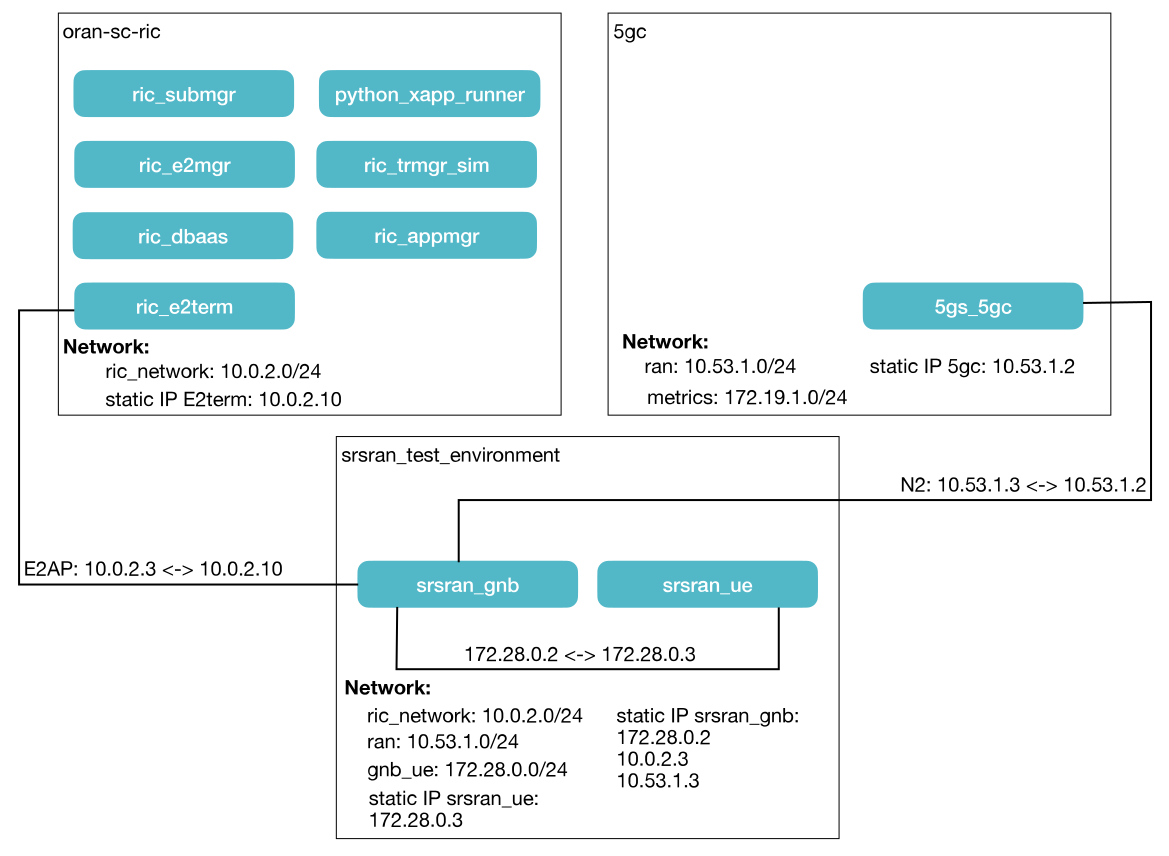
In the initial prototype, three separate Docker Compose setups are required:
- The first hosts all near-real-time RIC components (oran-sc-ric)
- The second contains the 5G Core (5gc)
- The third includes the gNB and UE (sran_test_environment)
To separate the different connections, four dedicated networks are defined:
- ric_network (10.0.2.0/24): Connects the Near-Real-Time RIC and the gNB
- ran (10.53.1.0/24): Handles connections between the gNB and the 5G Core
- metrics (172.19.1.0/24): Captures metrics from the 5G Core
- gnb_ue (172.28.0.0/24): Used exclusively within the srsran_test_environment to link the UE and gNB
⚠️ Warning:
When running on ARM-based Macs (Apple Silicon), you must explicitly set the platform for each Docker container:platform: linux/amd64Failing to do so will cause oran-sc-ric and 5gc to fail during compilation.
💡 Note:
While the UE and gNB containers will compile and run without specifying the platform, they perform extremely slowly, and the UE will not be able to establish a connection with the gNB.
UE and gNB Configuration
Various aspects of this demo can be customized using configuration files located in oran-sc-ric/e2-agents/srsRAN/. We store all customized config files directly in srsRAN_test_environment/config
gNB Configuration
The gNB requires a configuration file located at oran-sc-ric/e2-agents/srsRAN/gnb_zmq.yaml. This file defines several key aspects of the gNB setup, which can be adjusted based on the current needs:
-
Core network connectivity: IP addresses for the Access and Mobility Management Function (AMF) are set (AMF:
10.53.1.2, local CU-CP:10.53.1.1). -
RF interface: Uses the ZMQ driver, a virtual RF interface that allows operation without a physical radio. ZMQ is explained later in this section.
-
ru_sdr:
-
device_args: In the predefined config UE and gNB are executed on the same local machine therefore the following config is set:
device_args: tx_port=tcp://127.0.0.1:2000,rx_port=tcp://127.0.0.1:2001,base_srate=11.52e6When running the gNB and UE in separate containers (each with its own IP), this will no longer work. Instead, replace
127.0.0.1with the respective container IP addresses:device_args: tx_port=tcp://<IP of gNB>:2000,rx_port=tcp://<IP of UE>:2001,base_srate=11.52e6so for exapmple
device_args: tx_port=tcp://172.28.0.2:2000,rx_port=tcp://172.28.0.2:2001,base_srate=11.52e6✅ Hint: You can also set the
tx_porttotcp://0.0.0.0:2000to listen on all available network interfaces, simplifying connectivity when using Docker networks.The UE must be configured in the opposite way, as described below.
-
srate: Defines the sample rate in MHz used by the RF interface for both the gNB and UE.
-
tx_gain (Transmit Gain): Controls the output power of the transmitted RF signal, expressed in dB, and can be adjusted to optimize coverage, avoid interference, and match the dynamic range of the receiver.
-
tx_gain (Transmit Gain): Controls the output power of the transmitted RF signal, expressed in dB.
Note: Both gain values have no effect in a software-only (simulation) environment.
-
-
cell_cfg:
-
dl_arfcn: Downlink Absolute Radio-Frequency Channel Number (ARFCN), representing the specific channel used by the base station to transmit to the mobile device.
-
band: The band number indicating the frequency range used by the network. in 5G or LET band 3 refers to 1800 MHz
-
channel_bandwidth_MHz: Bandwidth of the radio channel, defining the frequency range used by the network for transmitting and receiving data.
-
common_scs: In 5G the radio spectrum is divided into subcarriers. The spacing between these subcarriers determines how the signal is structured in frequency and time.
common_src: 15means each subcarrier is 15 kHz apart, which is the default for low-frequency bands (FR1, below 6 GHz) in NR. -
plmn: The PLMN (Public Land Mobile Network) identifies the country and operator to which the gNB belongs. In this example,
plmn: 00101consists of:- MCC (Mobile Country Code):
001, identifying the country - MNC (Mobile Network Code):
01, identifying the operator
- MCC (Mobile Country Code):
-
tac: Tracking Area Code identifying a group of cells. Used for device location tracking, paging, mobility, and handovers. Must match the core network (AMF) configuration.
-
pdcch: Defines the Physical Downlink Control Channel, which carries control information from the gNB to the UE, telling it how and where to receive downlink data and schedule uplink transmissions.
-
prach: Defines the Physical Random Access Channel, used by the UE to initiate communication with the gNB and request uplink resources.
- pdsch: Physical Downlink Shared Channel used by the gNB to send data to the UE. The
mcs_tabledefines the mapping between modulation order and coding rate.qam64uses 64-QAM modulation, encoding 6 bits per symbol. - pusch: Physical Uplink Shared Channel used by the UE to send data to the gNB.
- pdsch: Physical Downlink Shared Channel used by the gNB to send data to the UE. The
-
e2: Configuration of ther interface and protocol between the RAN nodes (DU/CU) and the RAN Intelligent Controller (RIC).
- Cell configuration and logging: Defines the NR cell parameters, logging options, and PCAP capture settings.
- enable_cu_cp_e2/enable_cu_up_e2: Enable the E2 agent for CU-CP/CU-UP
- e2sm_kpm_enabled: Enables the KPM (Key Performance Measurement) module in the E2 agent. KPM is explained in
TODO - e2sm_rc_enabled: Enables the RC (RAN Control) service module, allowing the RIC to send control directives to the DU/CU.
- addr: IP address of the RAN Intelligent Controller (RIC) that the E2 agent connects to (e.g., 10.0.2.10).
- bind_addr: Local IP address of the E2 agent used to receive traffic from the RIC (e.g., 10.0.2.1).
-
RIC connectivity: IP of the RIC is
10.0.2.10and the bind IP for the local gNB agent is10.0.2.1. -
Metrics: Periodic reporting is enabled every 1000 ms for DU, CU-UP, and CU-CP.
-
This configuration file is copied during setup to srsRAN_Project/configs to make it accessible within the Docker environment.
UE Configuration
A second configuration file can be found at oran-sc-ric/e2-agents/srsRAN/ze_zmq.conf. This file contains settings for the User Equipment (UE) and must be consistent with the configuration of the gNB to ensure proper communication.
Key settings include:
-
[rf]: Contains the radio frequency configuration, including transmit/receive gains and the number of antennas. It is important to ensure that the sample rate (srate) matches the gNB configuration (in our case, 11.52e6 Hz).
Similar to the gNB configuration, the connection between the gNB and UE must also be properly specified. Since we run our design in two dedicated containers, it is not possible to use the default configuration.
device_name = zmq
device_args = tx_port=tcp://127.0.0.1:2001,rx_port=tcp://127.0.0.1:2000,base_srate=11.52e6
Instead, a configuration similar to the gNB setup is required:
    device_name = zmq
    device_args = tx_port=tcp://0.0.0.0:2001,rx_port=tcp://<GNB_IP_ADDRESS>:2000,base_srate=11.52e6
More specifically, in our setup we use:
    device_name = zmq
    device_args = tx_port=tcp://0.0.0.0:2001,rx_port=tcp://172.28.0.2:2000,base_srate=11.52e6
ZMQ (ZeroMQ) is used here as a lightweight messaging library to transfer IQ samples between the UE and gNB, as it is supported by srsUE.
-
[rat.eutra]: Contains the LTE Radio Configuration
- dl_earfcn: specifies the LTE downlink frequency that the UE should tune to. In this case, 2850 corresponds to a particular LTE band and frequency.
- nof_carriers: The number of carriers indicates how many component carriers (for carrier aggregation) the UE should use.
-
[pcap]: Defines the package capturing settings
-
[usim]: All parameters of the Universal SIM module
- mode: Indicates that the module operates in software/emulation mode.
- algo:
milenage– the default authentication algorithm standardized by 3GPP. - opc: Operator code used by the Milenage algorithm.
- k: Secret key assigned to the USIM for authentication purposes.
- imsi: Unique identifier for the mobile subscriber (used for network authentication).
- imei: Unique identifier for the mobile device (used for device identification and tracking).
-
[log]: Logging settings.
-
[rrc]: Defines the Radio Resource Control (RRC) parameters, managing connection setup, release, mobility, and radio resource configuration. The
releasespecifies the 3GPP version (e.g., 15 = 5G New Radio Phase 1), andue_categorydefines UE capabilities (e.g., 4 = Max DL 150 Mbps, Max UL 50 Mbps, 2x2 MIMO, 20 MHz bandwidth). -
[nas]: Defines the parameters of the NAS (Non-Access Stratum), which is responsible for mobility management, session management, and authentication. The
apnspecifies the Access Point Name, indicating which packet gateway (PGW) or service to use for Internet or private network access, whileapn_protocoldefines the IP protocol (e.g., IPv4 or IPv6) used for UE addressing. -
[gw]: Configuration of the gateway interface, which operates within a network namespace and uses a TUN/TAP interface (as described in the run demo section). The
netnsspecifies the network namespace for the UE,ip_devnamedefines the virtual network device name (e.g., TUN interface), andip_netmasksets the subnet mask for the interface. -
[gui]: Can be run in graphical or console mode.
⚠️ Warning: Docker mode currently does not support GUI features. All interactions must be done via the command line or API.
Similar to the gNB configuration file, this UE configuration file is copied to srsRAN_4G/configs to make it accessible within the Docker environment.